LiveSync2.5
Publisher Description
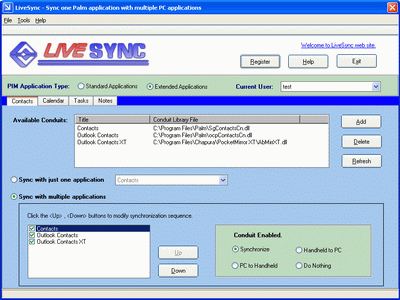
Synchronize one Palm application with multiple Desktop PC applications by LiveSync!
LiveSync helps the Palm users to synchronize Palm PIM applications, that is, the Contacts(Address Book), Calendar(Date Book), Tasks(Todo List) and Notes(Memo Pad), with multiple Desktop applications, e.g. Palm Desktop, Outlook, and even more.
LiveSync works as a HotSync agent that manage other Palm conduits during the HotSync process.
At first you may need to setup the LiveSync to choose which applications you want to synchronize, you may also customize the HotSync modes, such as synchronize, PC to Palm, Palm to PC or just do nothing. Then in the HotSync process, LiveSync will invoke the managed conduits one by one to synchronize your Palm with desktop PC.
LiveSync runs on Windows operating system and is based on Palm Desktop, so it is compatible with ALL Palm OS devices that is compatible with Palm Desktop.
The upgrade of LiveSync is always free!
About LiveSync
This program is available in English. It was last updated on 29 September, 2026. LiveSync is compatible with the following operating systems: Windows.
The company that develops LiveSync is LivePIM Software Inc.. The latest version released by its developer is 2.5. This version was rated by 1 users of our site and has an average rating of 4.0.
The download we have available for LiveSync has a file size of 1.0 MB. Just click the green Download button above to start the downloading process. The program is listed on our website since 2009-08-05 and was downloaded 303 times. We have already checked if the download link is safe, however for your own protection we recommend that you scan the downloaded software with your antivirus. Your antivirus may detect the LiveSync as malware if the download link is broken.
How to install LiveSync on your Windows device:
- Click on the Download button on our website. This will start the download from the website of the developer.
- Once the LiveSync is downloaded click on it to start the setup process (assuming you are on a desktop computer).
- When the installation is finished you should be able to see and run the program.
